Release Workflow
Use make release to cut a planned release from the develop branch.
What the Script Does
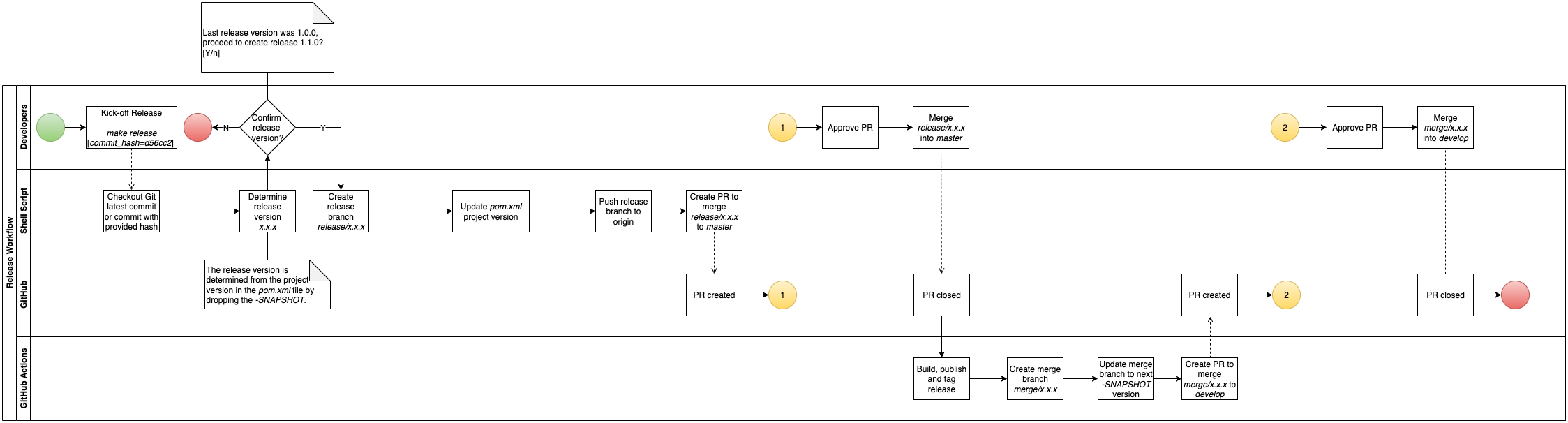
- Verifies you are on
developwith a clean working tree. - Pulls the latest
develop(or checks out a specific commit ifCOMMIT_HASHis supplied). - Reads the release version from Maven — strips the
-SNAPSHOTsuffix (e.g.1.10.0-SNAPSHOT→1.10.0). - Shows the last release tag and prompts for confirmation.
- Creates
release/x.y.zfrom the current commit. - Updates
pom.xmlviamvn versions:set, commits, and pushes. - Opens a pull request targeting
masterviagh pr create.
Release Workflow Diagram
Running a Release
# Standard release from the tip of develop
make release

# Release from a specific commit on develop
make release COMMIT_HASH=abc1234
After the PR Merges
Once the release PR merges into master, the github-workflows release script takes over and does the following:
- Publishes the release artifact — either to AWS CodeArtifact (libraries) or AWS ECR as a Docker image (deployable services).
- Creates a git tag and GitHub Release for the release version.
- Opens a back-merge PR (
merge/x.y.z → develop) and bumps the minor version for the next development sprint (e.g.1.2.0→1.3.0-SNAPSHOT).
Don't skip the back-merge
Approving the back-merge PR is not optional. If you skip it, the version bump never lands in develop — it will stay at the old SNAPSHOT (e.g. 1.2.0-SNAPSHOT) instead of advancing to the next one (e.g. 1.3.0-SNAPSHOT). The next release will be cut from the wrong version.
Always merge the back-merge PR before starting any new feature work.