Hotfix Workflow
Use make hotfix to apply an urgent fix directly to production (the master branch).
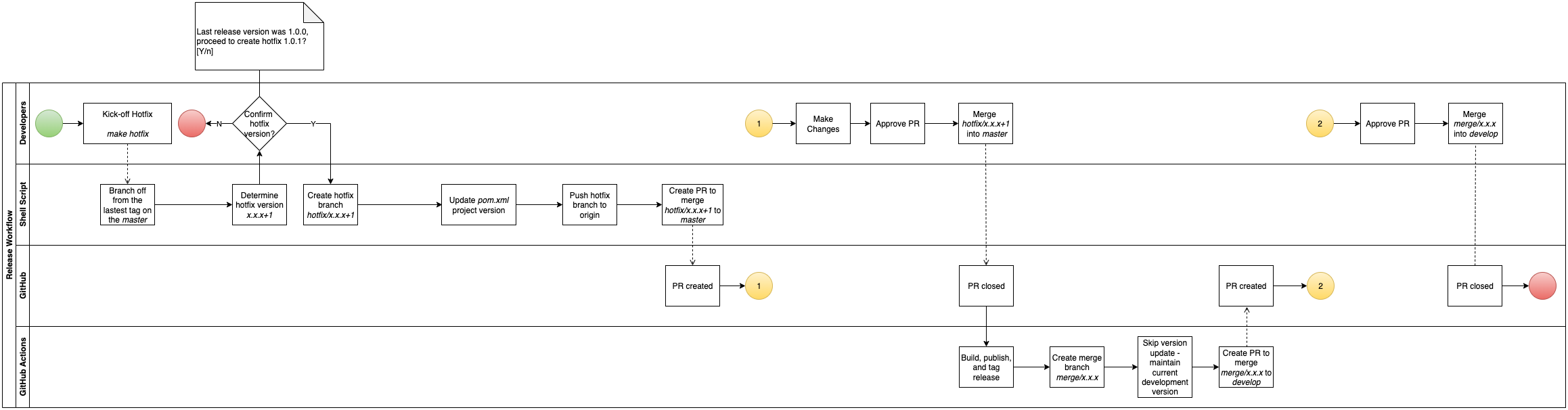
What the Script Does
- Verifies you are on
masterwith a clean working tree. - Pulls the latest
masterand tags. - Finds the latest git tag on
master(must matchX.Y.Zsemver) and auto-increments the patch version (e.g.1.0.0→1.0.1). - Prompts for confirmation.
- Creates
hotfix/x.y.zfrom the latest tag — not HEAD ofmaster— to ensure no unreleased changes are inadvertently included. - Updates
pom.xmlviamvn versions:set, commits, and pushes. - Opens a pull request targeting
masterviagh pr create.
Why branch from the tag, not HEAD of master?
HEAD of master might already contain the next version bump from a previous release merge. Branching from the latest tag guarantees the hotfix starts from exactly what was last shipped to production.
Hotfix Workflow Diagram
Running a Hotfix
make hotfix
After the PR Merges
Once the hotfix PR merges into master, the github-workflows release script takes over and does the following:
- Publishes the hotfix artifact — either to AWS CodeArtifact (libraries) or AWS ECR as a Docker image (deployable services).
- Creates a git tag and GitHub Release for the hotfix version.
- Opens a back-merge PR (
merge/x.y.z → develop). Because this is a hotfix (patch version > 0), the version inpom.xmlis not bumped —developretains its current SNAPSHOT version.
Don't skip the back-merge
Approving the back-merge PR is not optional. If you skip it, the hotfix exists only in master — develop never receives the fix. The bug you just patched in production will reappear in the next release.
Always merge the back-merge PR before resuming feature development.