gitflow
gitflow is a developer-side automation toolkit for the GitFlow branching and release strategy. It provides two interactive shell scripts — release.sh and hotfix.sh — that handle releases, hot fixes, branch creation, version bumping, and pull request creation from a developer's machine.
Add gitflow as a git submodule to any Maven project and you can run a full release or hotfix with a single make command.
What is GitFlow?
GitFlow is a branching model built around two long-lived branches:
| Branch | Purpose |
|---|---|
master | Always mirrors the production state |
develop | Integrates the latest features for the next release |
Supporting branches are created for specific tasks:
| Branch type | Pattern | Branches from |
|---|---|---|
| Feature | feature/* | develop |
| Release | release/x.y.z | develop |
| Hotfix | hotfix/x.y.z | latest tag on master |
GitFlow Workflow
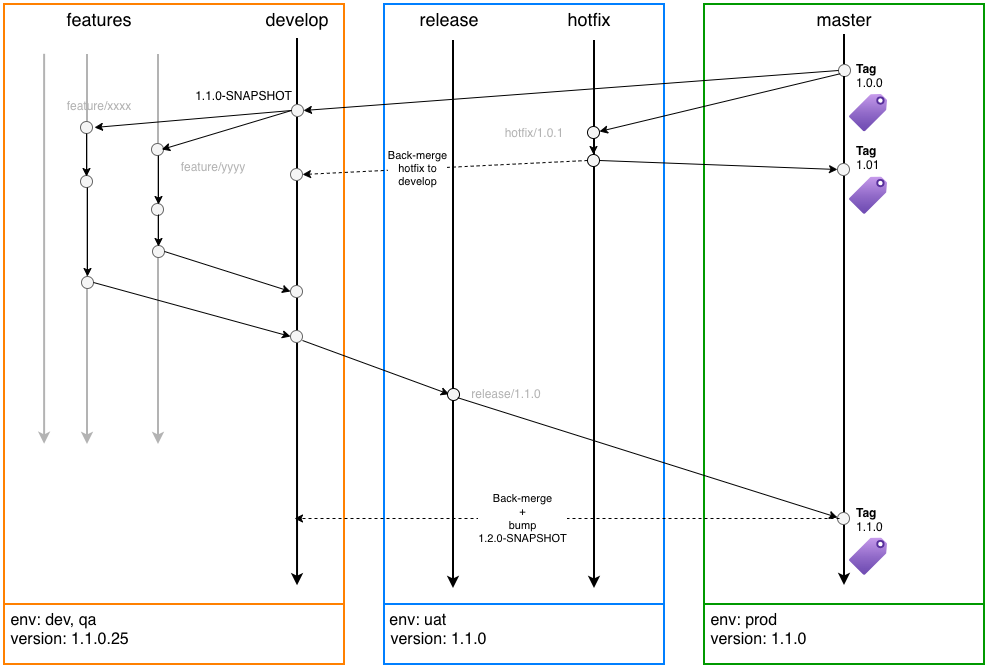
Architecture
Consumer projects wire in both repos:
gitflow- add this repository as a git submodule in the parent folder of the consumer project. To initiate the process, developers executemake releaseormake hotfixlocally, which creates the corresponding branch and opens a PR all in one step.- github-workflows — reusable GitHub Actions workflows referenced from GitHub Actions scripts in the consumer project's own
.github/workflowsfolder. Once the PR lands onmaster, GitHub Actions publishes artifacts, tags the release, and opens a back-merge PR intodevelopautomatically.